
Introduction
BrowserControl is a local MCP server that gives an AI agent a real Chromium browser. Your MCP client starts it, the agent calls its tools, and every tool that changes the page answers with a fresh screenshot of it.
What the agent sees
Each screenshot has a numbered box drawn around every control the agent can use, and the same numbers come back as text:
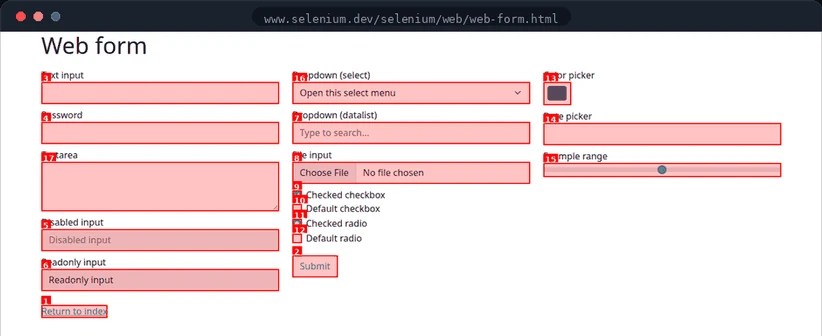
Found 17 interactive elements:
  [1] a - Return to index
  [2] button[submit] - Submit
  [3] input[text]
  [4] input[password]
  [5] input[text] (disabled)
  ...
To use a control, the agent passes its number: type_text(3, "hello"), then click(2). It never writes a CSS selector, and it never guesses at coordinates. This way of labeling a screenshot is called Set of Marks.
The one rule
Numbers belong to the screenshot they came from. Every action returns a new screenshot with a new map, and a control that was 7Submit a moment ago may be number 9 now. An agent should read the newest map before every action that takes an ID.
If an ID has gone out of date, BrowserControl doesn't guess. It refuses to act and returns a fresh screenshot to pick again from.
What else it does
The numbered screenshot is the core, but BrowserControl is a whole browser:
find, then run several steps in one act call.Read and extract Pages as Markdown, tables and links as JSON, or any fields you describe.Debug Console, page errors, network traffic with headers and bodies, HAR export.Test edge states Mock API responses, throttle the network, emulate devices and timezones.Your own Chrome Attach to the Chrome you're signed in to, or open isolated sessions.Record and export Save Playwright traces and turn a session into a Playwright test.Good to know
- It runs on your machine. The browser, its profile, and everything it captures stay local. BrowserControl calls no model and needs no API key.
- Logins persist. The default browser profile lives in
~/.browsercontrol/user_data, so a site you sign in to once stays signed in. - It works with any MCP client. Claude Code, Claude Desktop, Cursor, VS Code, Gemini CLI, Zed, and anything else that speaks MCP over stdio or HTTP.