
Your first session
This walkthrough uses Selenium's public demo form, so nothing you type goes anywhere that matters. It takes two prompts and shows the habit every good BrowserControl session depends on: read the newest numbers before acting.
Open the form
Ask your agent:
Open https://www.selenium.dev/selenium/web/web-form.html with BrowserControl. Tell me the numbers of the text input and the Submit button.
The agent calls navigate_to, and BrowserControl answers with this:
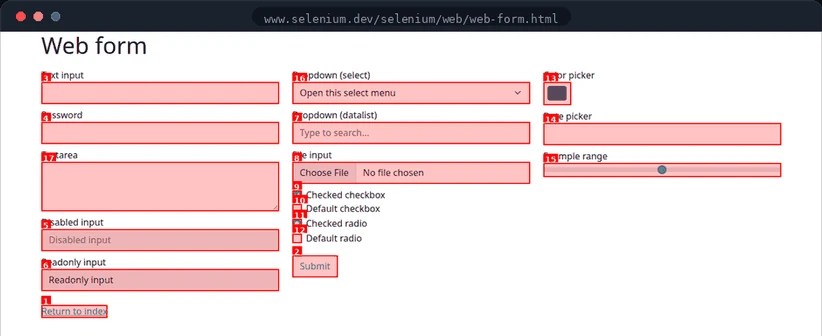
Here the text input is 3Text input and the button is 2Submit. The disabled field is drawn grey and listed as (disabled).
Fill and submit
Ask:
Type "BrowserControl demo" into the text input, then submit the form and confirm the next page says "Form submitted".
The agent works in three moves:
type_text(3, "BrowserControl demo"). The response is a new screenshot and map.- It finds Submit again in that new map and calls
clickwith its current number. - It checks the result in the returned screenshot, or reads the page with
get_page_content().
Why look up Submit again?
Typing doesn't visibly change the form, but it does produce a new screenshot, and numbering is rebuilt from scratch every time. Here Submit probably kept number 2. On a page that shifts, it wouldn't. Reading the latest map costs nothing, while acting on an old number gets a stale element error at best.
Do it in one call
Once the agent knows the numbers, it can batch the steps with act:
→ act([{"action": "type", "element_id": 3, "text": "BrowserControl demo"},
       {"action": "click", "element_id": 2}])
Ran 2 of 2 step(s), 0 failed:
  1. ok: typed 'BrowserControl demo' into [3]
  2. ok: clicked [2]
Every ID in an act call refers to the screenshot taken before the call, so batching is safe as long as the steps don't navigate away halfway through.